
Recurring tasks and reminders
Let Agent Blond run regular reports for you in the background — for example, an overview of outstanding invoices every Monday morning, delivered by email.
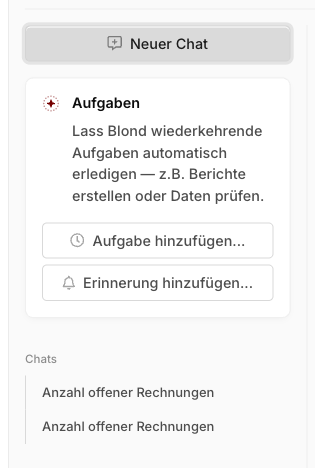
Create a task or reminder
You create a task by asking Agent Blond to set one up. Three paths get you there:
Via the buttons: Add task… or Add reminder… in the left rail of the chat.
Straight in the input field: "Help me set up a task that shows me outstanding invoices every Friday."
From a conversation: When you've just asked something useful, tell Agent Blond: "Run this analysis every Monday from now on."
TIP
After creation, Agent Blond automatically refines your prompt into a precise working instruction — with an explicit time window and Swiss formatting. You can adjust it anytime via Edit task on the task's detail page.
Mode per task
Each task has its own mode — Read-only or Agent. A task in agent mode can create or change data on its own, so pick the mode deliberately. A pure analysis always belongs in Read-only.
Reviewing results
Each task has a detail page listing all previous Runs. From there you can:
- Run task now — without waiting for the next scheduled run
- Chat with report — dig into a result in a conversation and ask follow-up questions
- Enable, disable, or delete the task
Email notifications
If a task finds something worth your attention, you get a short email with the results and a link to the full report in the chat.
Limits
| Topic | Detail |
|---|---|
| Count | Maximum of 10 tasks per person. |
| Frequency | At least daily — no hourly tasks. |
| End date | Tasks can have an end date — they are removed automatically after that. |
| AI credits | Runs count toward the weekly quota. When it's used up, the run is marked Skipped and the task continues normally at its next scheduled time. |