
Project finances
Understand what the Finances card on the project overview shows and how turnover, drafts and the project result fit together.
The card sits at the top of every project's overview. You see it if you're allowed to create invoices. How much of it depends on your role (see Who sees what). It's missing on internal projects, and project phases don't have their own: their figures roll up into the parent project.
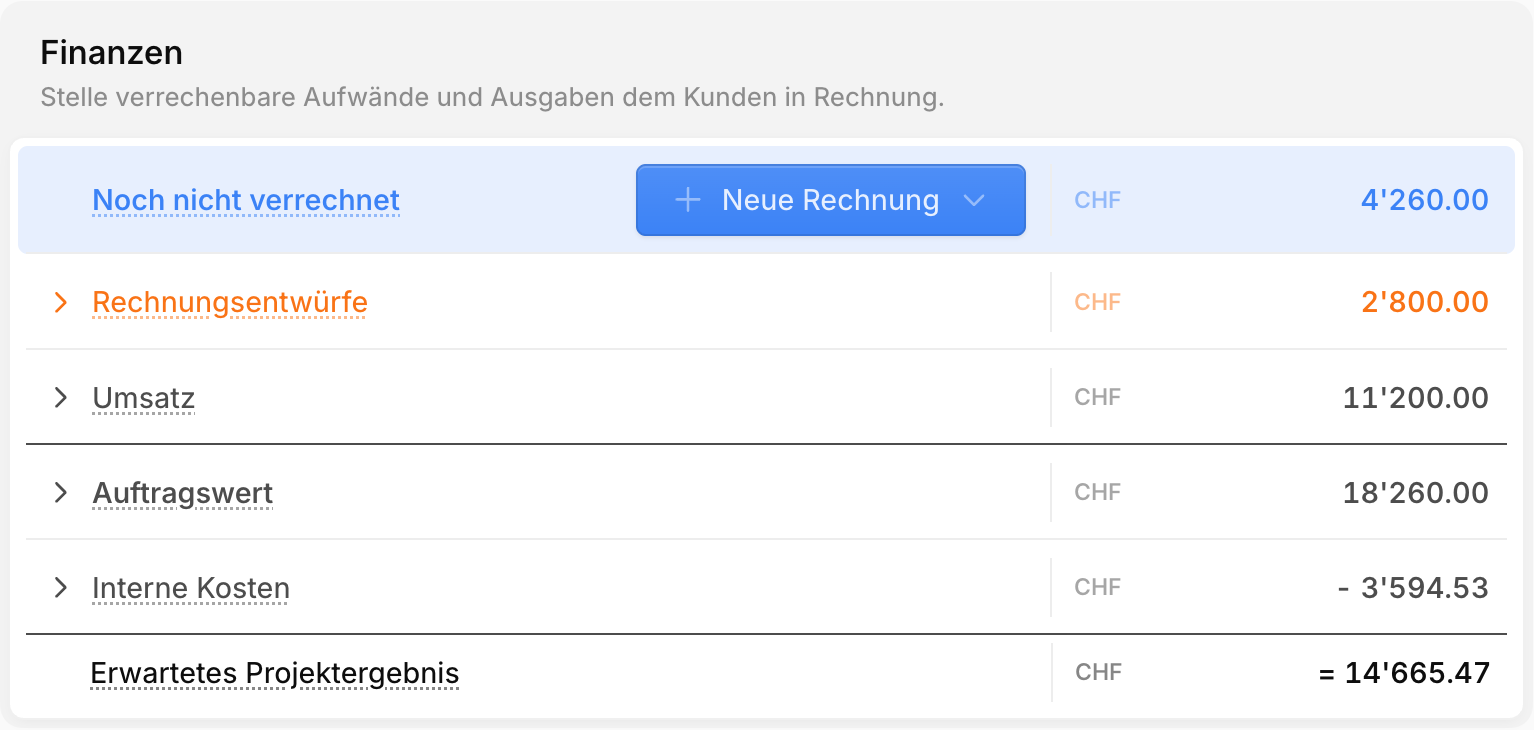
The rows at a glance
The card adds up from top to bottom: every row feeds into the result, and nothing is counted twice.
| Row | What's in it |
|---|---|
| Not yet billed | work that isn't on any invoice yet |
| Draft invoices | invoices that haven't been sent yet |
| Turnover | sent and paid invoices |
| Order value or Expected revenue | the sum of the three rows above |
| Internal costs | what the project costs you, deducted |
| Project result | what's left at the bottom line |
Invoices always count excluding VAT. Not yet billed, Draft invoices and Turnover only appear when they have an amount. The subtotal only appears once at least two of them have an amount. Next to Turnover you also see how much of it is still unpaid: sent, but not yet paid.
New invoice in the Not yet billed row takes you straight into billing. What happens there is covered in Billing projects.
Why drafts have their own row
A draft isn't a claim yet. You can still change or delete it, and the customer has never seen it. That's why it doesn't count towards Turnover yet.
Still, the amount is no longer open: as soon as you bill, it's reserved for that draft. So every franc shows up in exactly one row and moves down as the work progresses:
Not yet billed  →  Draft invoices  →  Turnover
    (bill)             (send)
Without this split, a forgotten draft would inflate turnover, or the same amount would show up as open and billed at the same time.
What "Not yet billed" means
How the amount comes about depends on the billing type.
Hours & expenses
This row holds everything that's tracked, billable and not on any invoice yet:
- Hours per hourly rate, valued at the billing rate (e.g. "48:00 hrs × 210.00")
- Tracked products at their sales price
- Billable expenses
- Project phases that still have unbilled work
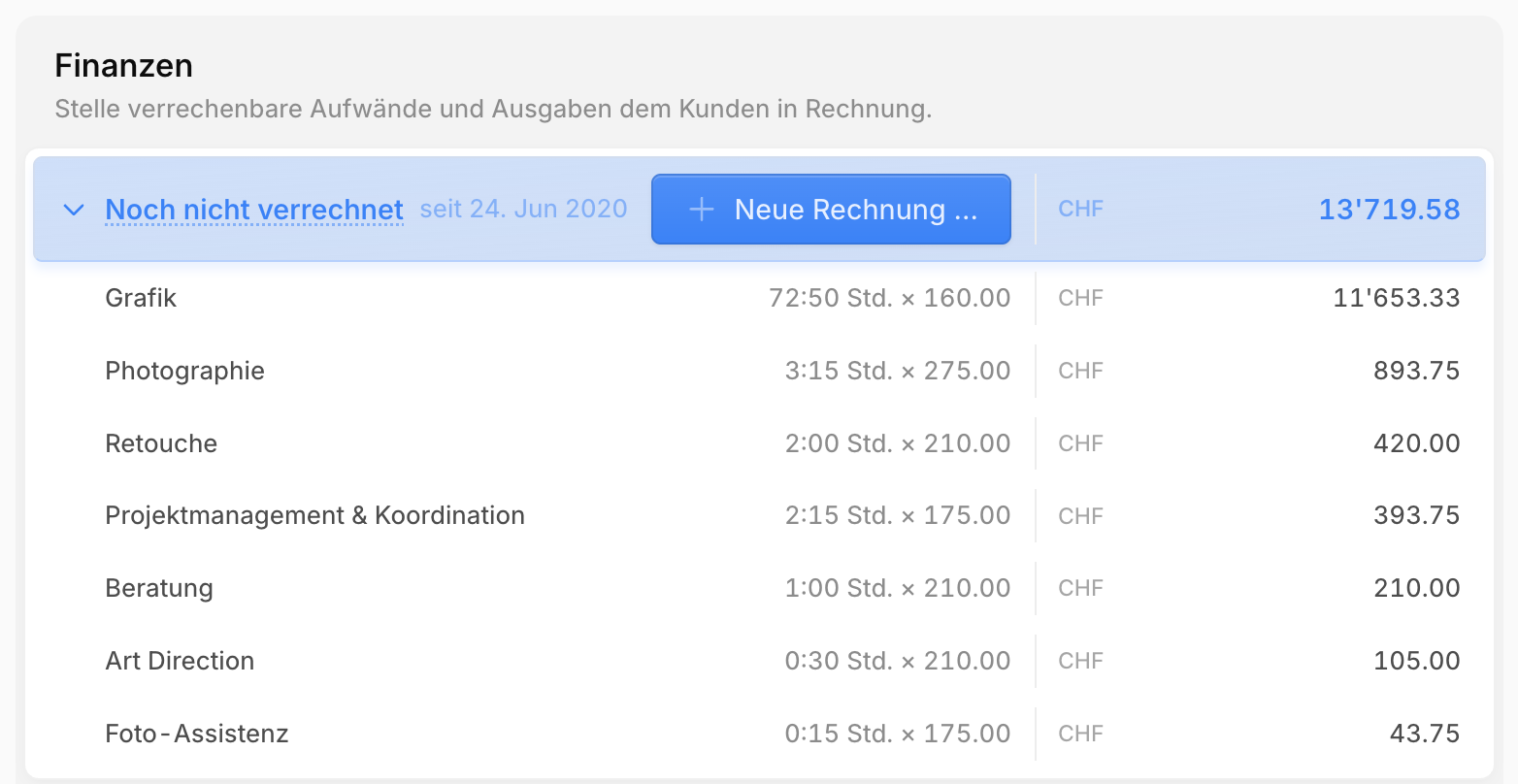
When you bill, the entries are locked and leave this row. Their amount then sits in the draft.
TIP
Next to the label you'll see since and a date: the date of the oldest unbilled entry. If it's long ago, work has probably been left lying around that should have been invoiced a while back.
Flat-rate
This row holds the part of the approved quotes that isn't on any invoice yet:
Not yet billed = approved quotes − Turnover − Draft invoicesSo drafts are deducted before they're even sent. That stops you from billing the same amount twice.
For the project in the first screenshot, it works out like this:
| Amount | |
|---|---|
| Approved quotes | CHF 18'260 |
| Two instalments, sent (Turnover) | − CHF 11'200 |
| Third instalment, in draft (Draft invoices) | − CHF 2'800 |
| Not yet billed | CHF 4'260 |
Together, the three rows add back up to the Order value of CHF 18'260. If you've billed more than quoted, the Order value row shows the difference.
You see the same calculation when you bill the quote: the notice at the top shows how much has already been billed and, separately, how much more is sitting in draft invoices.
Note
If you delete a draft, its amount is freed up and shows under Not yet billed again. On flat-rate projects, tracked hours don't change this amount. They only count against the project budget and internal costs.
Internal costs
Internal costs show what the project costs you, regardless of what you bill the customer. Expanded, you see three items:
| Item | Valued at |
|---|---|
| Tracked time | the team member's internal hourly rate, not the billing rate |
| Tracked products | the purchase price (or the sales price if there's none) |
| Expenses | the expense amount |
Everything recorded on the project and its phases counts, including non-billable hours and expenses. Clicking an item opens the project's Time tracking or Expenses tab.
Project result
The result adds up everything the project brings in, billed or not, and deducts the internal costs:
  Not yet billed
+ Draft invoices
+ Turnover
= Order value (flat-rate) or Expected revenue (hours & expenses)
− Internal costs
= Project result
As long as something is still unbilled or in draft, the row reads Expected project result: that's what you keep once everything has been billed and sent. Once everything is sent, it shows the Project result. If it's negative, it turns red.
Warning
Internal costs only include what has been tracked so far. On flat-rate projects, by contrast, the full order value already counts. Midway through a project, a flat-rate project therefore looks better than it will in the end, because the costs for the remaining work are still missing. The project budget shows how much of the budget is already used.
Expanding the details
Every row with an arrow expands with a click:
| Row | Expanded, you see | A click opens |
|---|---|---|
| Not yet billed | hourly rates, products, expenses, phases — or the approved quotes, as long as nothing has been billed | time tracking, expenses, the phase — or the quote |
| Draft invoices, Turnover | each invoice with number, title, date and status | the invoice |
| Order value | the approved quotes | the quote |
| Internal costs | Tracked time, Tracked products, Expenses | time tracking or expenses |
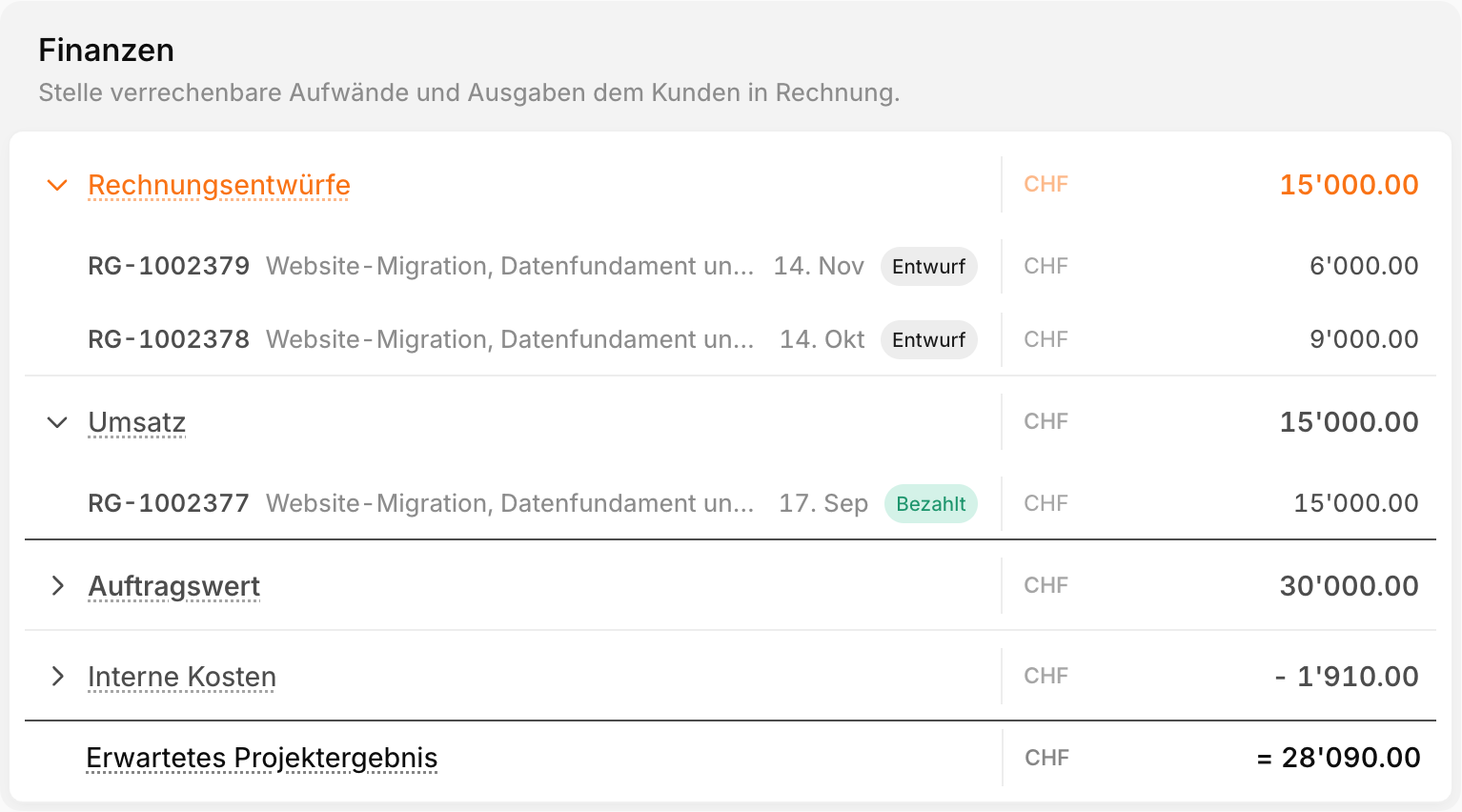
In this example, the CHF 30'000 quote is covered exactly by the paid invoice and the two drafts. That's why the Not yet billed row is missing: there's nothing left to bill, only to send. Because the drafts are still open, the result is still an expected one.
The status tells you where an invoice stands: Draft, Scheduled (sending is planned), Sent, Overdue, a Reminder level or Paid. The date only shows the year if the invoice is from an earlier year.
Who sees what
The card only shows what your role allows:
| Role | What you see on the card |
|---|---|
| Administrator, Coordinator, Accountant | the whole card |
| Project manager | the whole card on projects you lead yourself. On other projects only Not yet billed with New invoice, without drafts, turnover and result |
| Member, Auditor | no card |
TIP
If a project manager should see a project's result, set them as the project's Project manager.
What's next
- Billing projects — turning "Not yet billed" into an invoice
- Project budget — tracking usage against the quoted budget
- Sending invoices — so a draft becomes turnover