
Personal settings
Choose which notifications you want to receive and adjust settings that only apply to the currently selected company.
You'll find your personal settings via the user menu at the bottom of the sidebar or directly at https://app.blond.swiss/user/settings.
The page is split into two areas — each with its own Save button:
| Area | Scope |
|---|---|
| Notifications (top) | Your user account, across all companies |
| Grey block (further down) | Only the company you currently have selected |
TIP
If you switch to another company, the grey block uses that company's own configuration.
Notifications
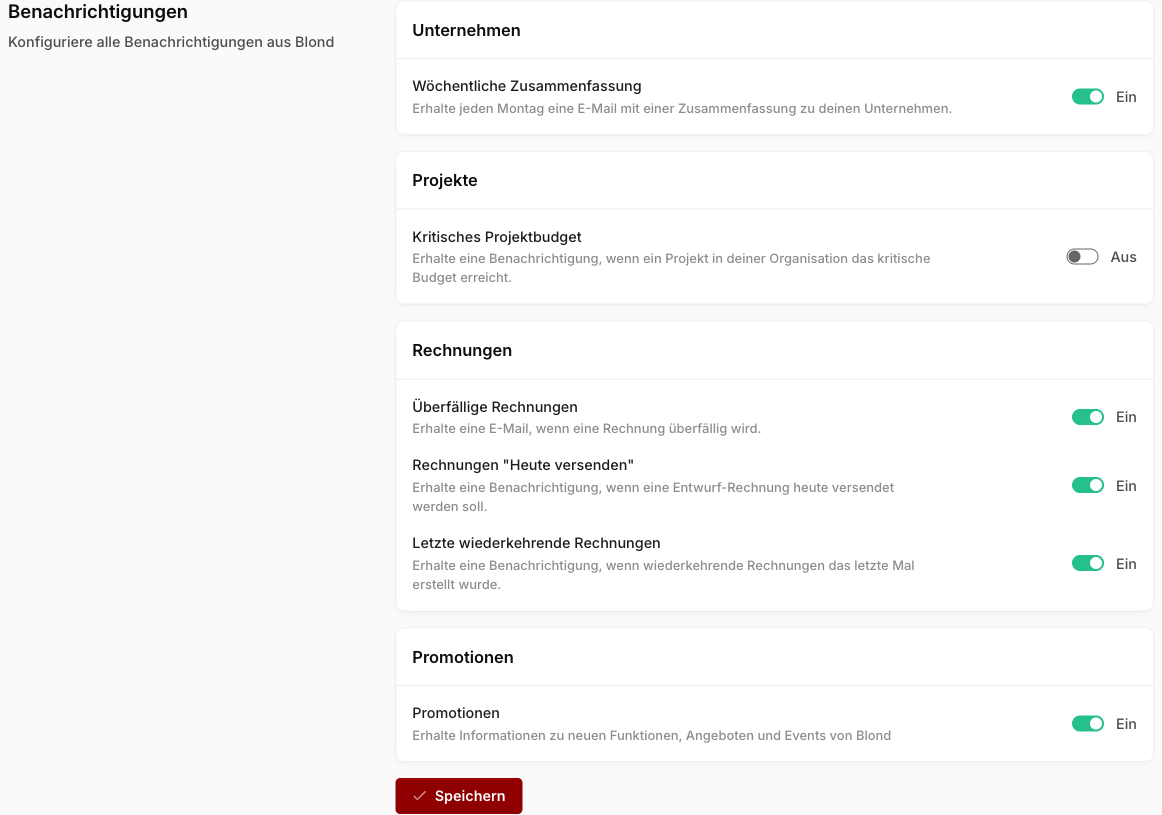
In the Notifications area you decide which events trigger an email. Switch each setting On or Off — the description next to each toggle explains what it does.
Hidden cards
You can dismiss cards on the dashboard with the × icon. They then appear in the Hidden cards list, from where you can bring them back any time with Restore.
Agent Blond settings
The Chat section controls how Agent Blond works for you:
Custom instructions: Personal guidance that tailors its responses to how you work. They complement the organization-wide instructions defined by the owner.
Confirm agent actions: When Agent Blond asks for approval before making changes — from Never ask to Every change.
Learn from activity: Whether Agent Blond may automatically remember things from your conversations and activity overnight.
Voice: The voice for voice mode in the mobile app.
Email to your agent: Your personal agent address and its approved senders.
See Personalizing Agent Blond and Forwarding emails to Agent Blond for details on all options.