
Customizing number ranges
Control how Blond numbers your invoices, quotes and expenses — starting number, digit count and prefixes.
You'll find the number ranges under Settings → Number ranges, or directly at https://app.blond.swiss/organization/settings/number-range.
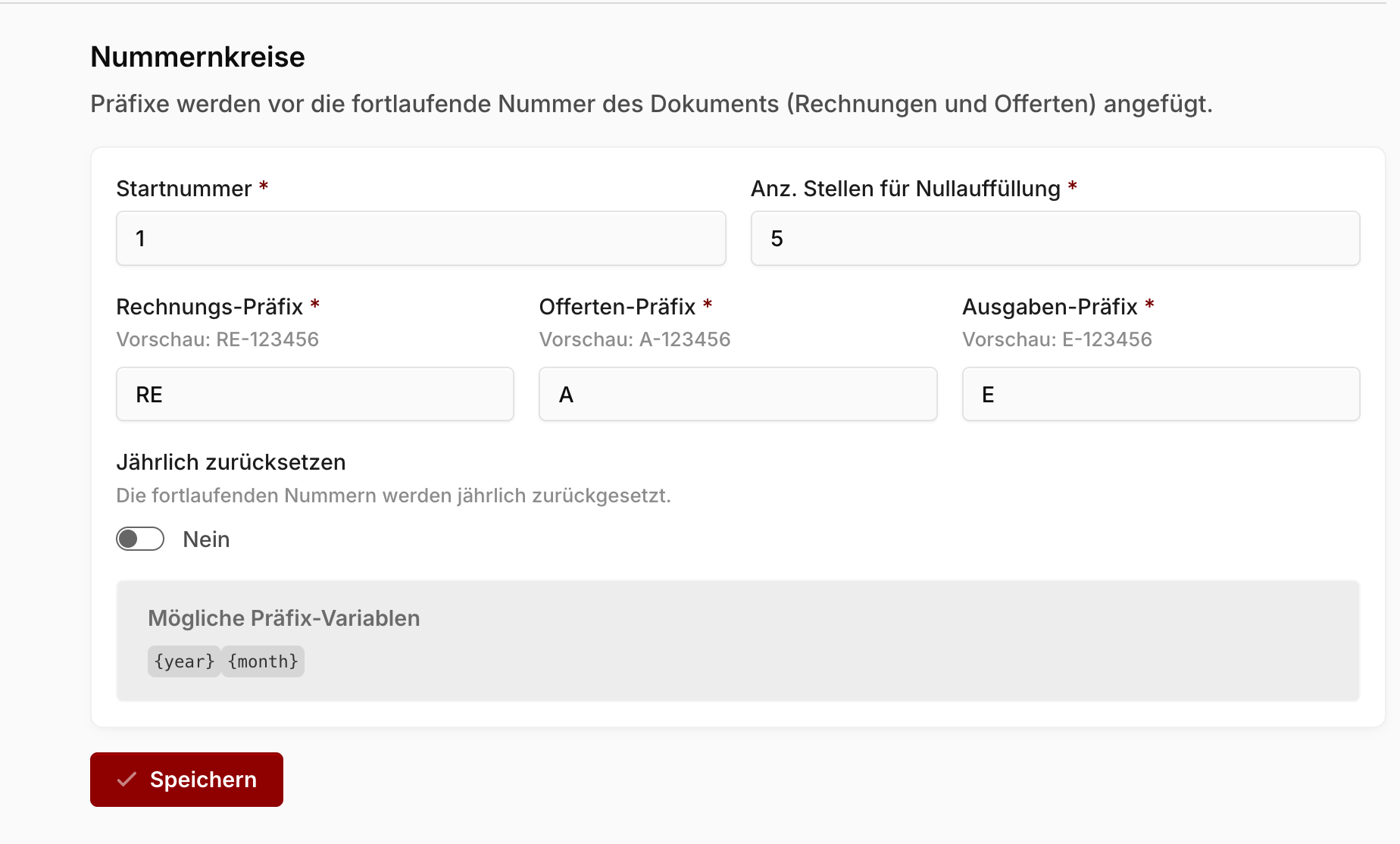
Starting number: The number the document sequence begins with — handy if you're switching to Blond from another software and want to continue the numbering seamlessly.
Digits for zero padding: The minimum number of digits document numbers should have. Missing digits are padded with zeros — with 5 digits, number 12 becomes 00012, for example.
Prefixes: You set a separate prefix for invoices, quotes and expenses, placed before the sequential number (e.g. "R" for invoices, "Q" for quotes). Below each field, a preview shows you exactly what the number will look like.
TIP
In the prefixes you can use the variables {year} and {month} — they're replaced with the current year or month when the document is created.
Yearly number ranges
With the Reset yearly switch, the sequential numbers restart at 1 every new year. Enable the option in the previous year already, so the new numbering takes effect right at the turn of the year.
Note
With yearly number ranges, always use the {year} variable in all prefixes. Without the year in the prefix, duplicate document numbers will occur across the years.